
Yes, you can make a new Dating app account with the same phone number if your old profile was permanently deleted in good standing. Once deleted, your number is released immediately with zero mandatory waiting period.
However, if your existing account is still active, entering your number logs you back in rather than creating a second profile. If your previous account was banned, the Dating app permanently blacklists that phone number and blocks new registrations.
Deleting an account also erases all matches, messages, and active purchases permanently.
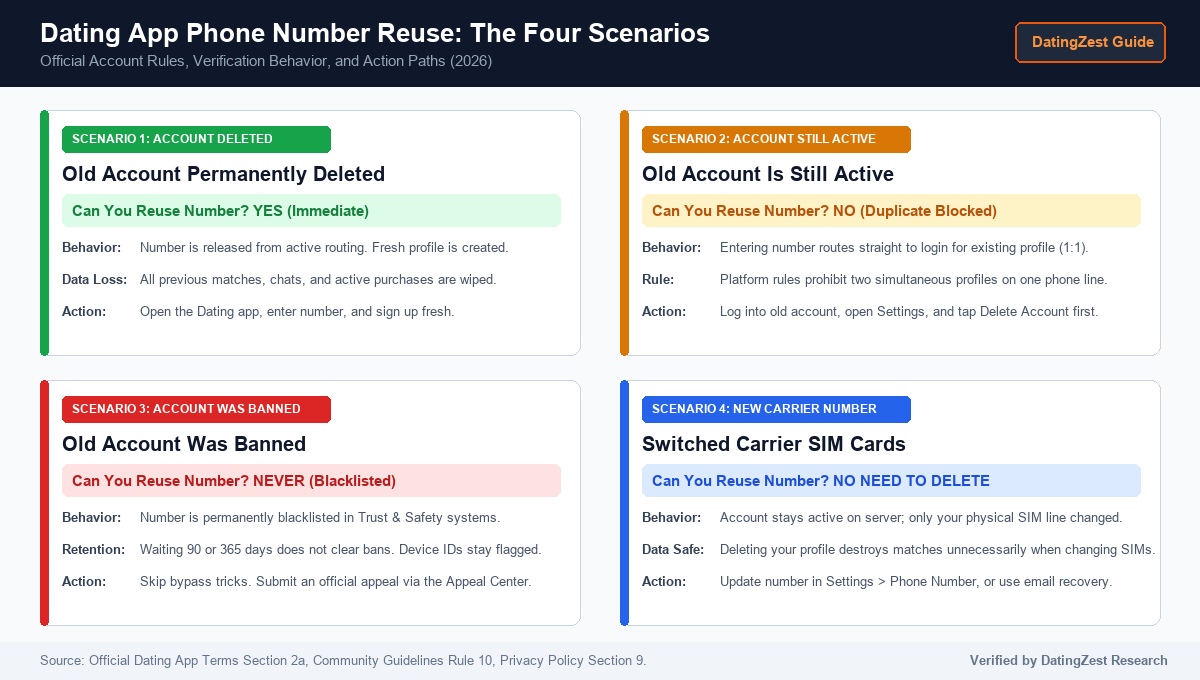
The Four Phone Number Scenarios: Decision Matrix
Your ability to reuse a phone number depends on your account status:
| Account Status | Reuse Same Number? | Profile Impact | Immediate Action |
|---|---|---|---|
| Deleted Cleanly | Yes (Immediate) | Data wiped | Register as new user |
| Currently Active | No (Blocked) | Logs into profile | Einstellungen > Konto löschen |
| Account Banned | No (Blacklisted) | Error 40303 | Follow appeal steps |
| New Carrier SIM | No need to delete | Matches intact | Settings > Update Phone Number |
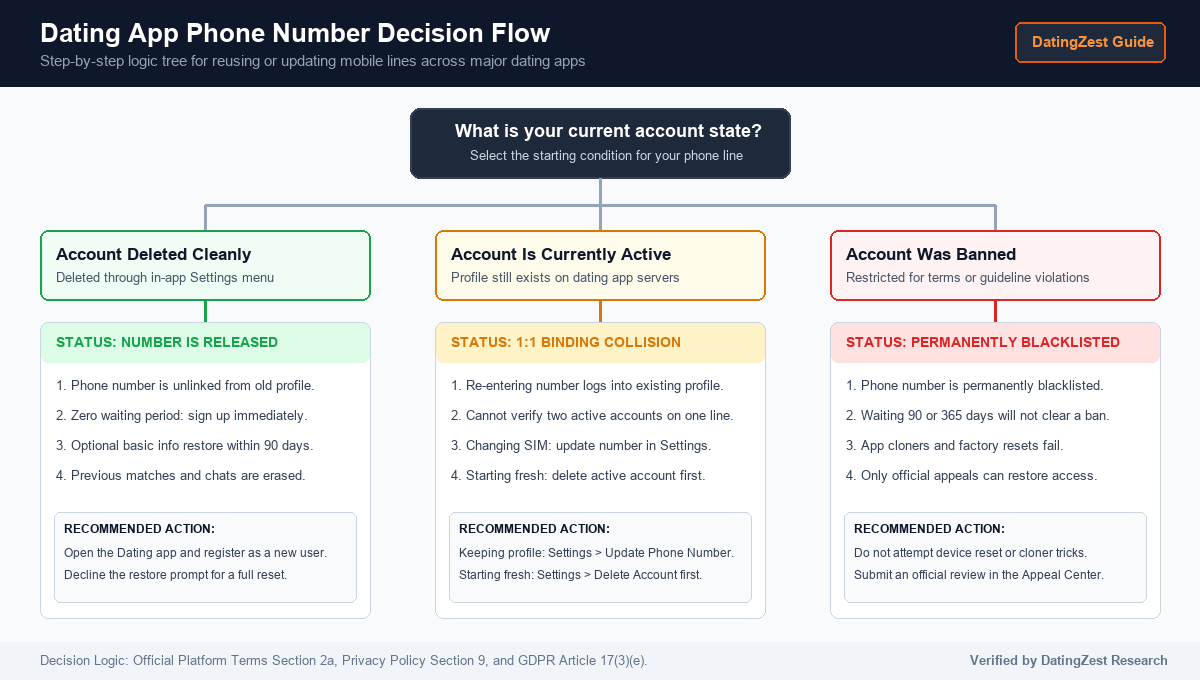
The 1:1 Phone Rule: Why You Cannot Have Two Active Accounts
Dating app security enforces cellular verification to block bots and duplicate accounts. Under official terms (Section 2a) and Rule 10 (“One person, one account”), each member may hold only one active profile.
A phone number links to one active profile at a time. Entering an active number logs you straight into your existing profile instead of creating a second one. Attaching an in-use number to another account returns an error stating the number is already registered.
Re-Registering After Deleting Your Account: The 90-Day Retention Policy
You do not need to wait 90 or 100 days after deleting an account before reusing your phone number. Under the 3-month reset rule and Privacy Policy Section 9, the 90-day period is an internal safety archive under GDPR Article 6(1)(f), not a user lockout.
This 90-day window investigates reported safety violations and offers an optional demographic pre-fill (name, age, gender) if you return within 90 days. Your number is unlinked immediately upon deletion for fresh signup, and Photo Verification biometric vectors are purged after 30 days.
What Happens If Your Account Was Banned?
When an account is banned, the Dating app permanently blacklists the phone number, email hash, device identifiers, and payment tokens under GDPR Article 17(3)(e). Waiting 90, 180, or 365 days will not clear a banned number.
Common workarounds fail against server-side enforcement:
- App cloners (Island, Shelter): Local sandboxes cannot bypass server-side phone blacklists.
- Factory resets: Wiping a phone leaves your carrier number flagged on servers.
- VPNs: Changing your IP leaves your phone and hardware tokens blacklisted.
The only legitimate solution is submitting a review via the official Appeals Center, covered in our guide on how to get unbanned from a dating app.
Step-by-Step: How to Reset or Update Your Account Safely
Uninstalling the app icon only removes local files; your profile stays active and keeps your number locked.
To start over with the same phone number:
- Open the Dating app, tap your Profile icon, and open Settings.
- Scroll down and tap Delete Account.
- Tap Delete My Account (skip Pause Account) and confirm.
To keep matches when changing numbers: Do not delete your account. Go to Profile > Settings > Account Settings > Phone Number > Update My Phone Number, or tap “Trouble Logging In?” to recover access via email.
Subscription Warning: Deleting your profile does not cancel store billing:
- Apple App Store (prefix MK): iPhone Settings > Apple ID > Subscriptions > Dating app > Cancel.
- Google Play Store (prefix GPA.): Play Store > Payments & subscriptions > Subscriptions > Dating app > Cancel.
Troubleshooting Phone Verification Errors
Match your verification error to the exact fix:
- Error 40303 or Recycled Numbers: Carriers reassign numbers after 60 to 90 days. If the prior owner was banned or left an active profile, submit your carrier receipt to Support to release the line.
- SMS Code Not Arriving: MVNO carriers sometimes block shortcodes, or rapid resets trigger a 24-hour rate limit. See our guides for dating app SMS verification not sending codes und die “Oops too many attempts” error.
- VoIP Line Rejection: Virtual VoIP numbers from Google Voice, Brenner, und Gedämpft are blocked by Telesign and Twilio Lookup with a “Phone carrier not supported” error. Use texting apps and numbers that work with a dating app, such as a mobile SIM or a prepaid physical SIM like Tracfone.
When You Need a Fresh Secondary Number
Use free official options first: update your line in Settings, recover via email, or delete your old account cleanly.
For privacy from reverse lookups and contact syncing, or to use dating apps without a phone number tied to your personal SIM, DatingZest dating app phone verification provides a private, single-use non-VoIP cellular number for a $9.95 one-time payment (no subscription):
- Genuine carrier routing: Non-VoIP SIM lines pass carrier line-type lookups.
- Active session timer: Private dashboard provides a 9-minute 30-second (570-second) window for your 6-digit SMS code (inbound SMS only; voice calls unsupported).
- Refund protection: Unreceived codes qualify for a replacement credit or refund under our Rückgabepolitik.
- Account longevity tip: Verify your email in Account Settings right after onboarding to prevent lockouts. A secondary number protects privacy, but cannot unban restricted accounts or bypass hardware flags.
Same Phone Number Rules Across Other Dating Apps
Major dating platforms enforce similar 1:1 phone verification rules:
| Platform | Reuse Post-Deletion? | Multi-Account? | Retention | Dedicated Guide |
|---|---|---|---|---|
| Dating-App | Yes (Immediate) | Prohibited (1:1) | 90 Tage | Immediate reset |
| Hummeln | Yes (Immediate) | Prohibited (1:1) | 28 Tage | Create Bumble without your phone number |
| Scharnier | Yes (Immediate) | Prohibited (1:1) | 90 Tage | 24-hour SMS limit |
| Badoo | After 28 days | Prohibited (1:1) | 28 Tage | Badoo without a phone number |
| Grindr | Up to 5 accounts | Conditional | 24 hours | Grindr without a phone number |
Häufig gestellte Fragen
Must I wait 90 days to remake a Dating app account?
No. Privacy Policy Section 9 outlines a 90-day internal safety archive, not a user lockout. You can register immediately after deleting an account in good standing.
Can I use one phone number for two Dating app accounts?
No. Strict 1:1 binding routes an active number into your existing profile instead of creating a second account.
Does deleting my Dating app account cancel my subscription?
No. Cancel Apple App Store or Google Play auto-renewal directly in your device subscription settings.
Why does the Dating app say my phone number is already registered?
Your number remains tied to an active profile or was reassigned by your carrier. Log in via email to delete the old profile, or contact Support for a recycled SIM.

 English
  Portuguese
  Spanish
  French
  German
  Dutch
Dutch
Schreibe einen Kommentar