

Yes, you can use Badoo without a phone number by signing up with Email, Google, Apple ID (on iOS), or Facebook in the mobile app, or on badoo.com in a web browser without downloading the app.
If you are looking for how to bypass Badoo phone number verification, skipping the phone field with an email or social login works on clean home networks.
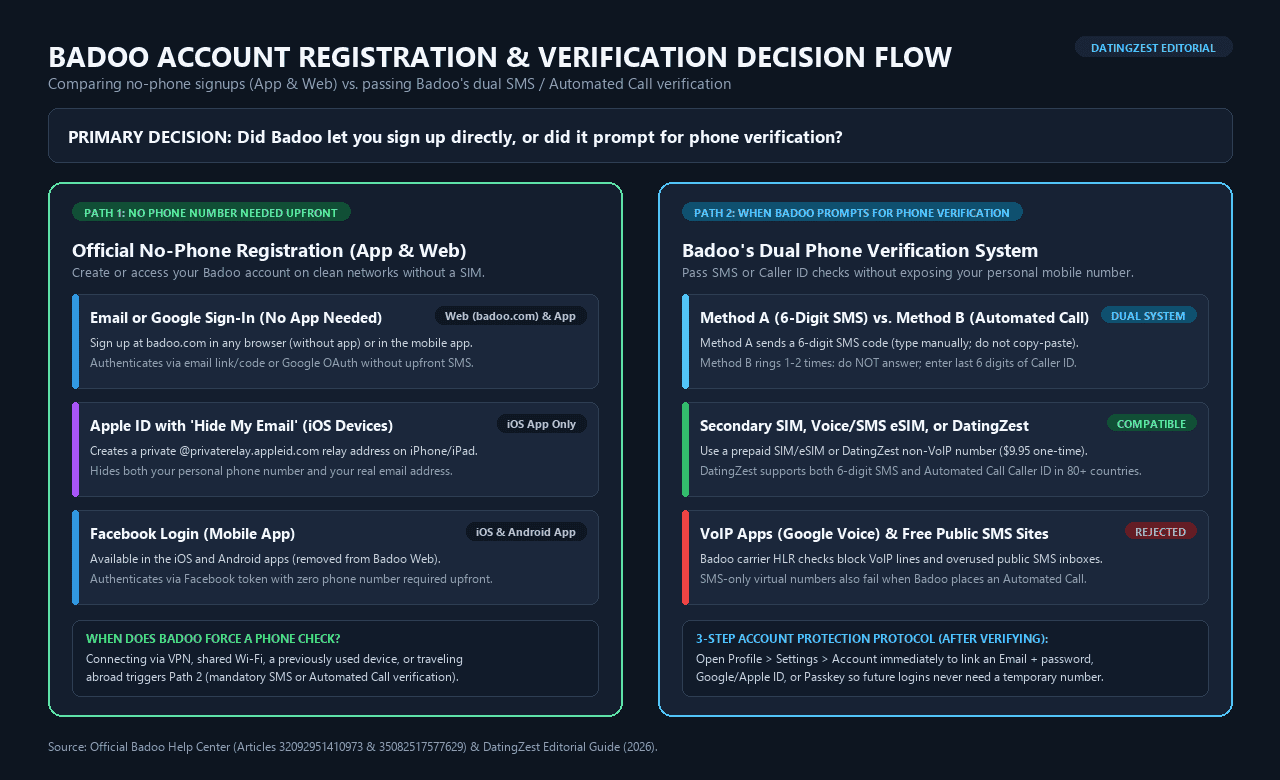
When Badoo forces a security check via a 6-digit SMS code or an automated call (entering the last 6 digits of the Caller ID), you can verify with a secondary SIM or a private non-VoIP number.
How to Bypass Badoo Phone Number Verification: When It Works

Whether you can skip Badoo’s phone screen or need an alternative number depends on how you connect:
- When you can skip the phone prompt completely: Registering with Email, Google, Apple ID, or Facebook on a clean residential Wi-Fi or cellular connection creates your profile without asking for a phone number upfront.
- When Badoo forces a phone check: Badoo locks registration behind mandatory phone verification if you tap the mobile number box first, connect through a VPN, proxy, or iCloud Private Relay, use public Wi-Fi, sign up on a previously used device, or log in while traveling abroad.
- How Badoo’s dual phone check works:
- Method A (6-Digit SMS): Badoo texts a 6-digit code valid for 5 to 10 minutes.
- Método B (llamada automatizada): Badoo places a brief flash call that rings once or twice and hangs up. No contestes; look at your screen or call log and enter the últimos 6 dígitos del número de la llamada entrante.
Method 1: Sign Up With Email, Google, Apple ID, or Facebook (App or Web Without App)
Using an official email or social login is the fastest free way to create or sign in to a Badoo account without a phone number:
- Abrir Badoo Web in any mobile or desktop browser (without installing the app), or open the Badoo iOS/Android app.
- Browser Trick: Before opening
badoo.com, turn off any VPN or iCloud Private Relay and use a fresh incognito/private browser tab on home Wi-Fi. This prevents Badoo from flagging your IP or forcing the mobile phone screen.
- Browser Trick: Before opening
- Skip the phone input box and select Continue with Email, Continuar con Google, Continuar con Apple (iOS app only), or Continuar con Facebook (mobile app only; Facebook login is no longer on Badoo Web).
- iOS Privacy Trick: Choose Ocultar mi correo electrónico al iniciar sesión con Apple para generar una dirección privada de
@privaterelay.appleid.comaddress. Badoo forwards login codes to your Apple inbox without ever seeing your real email or phone number, and you can revoke the relay address anytime iniPhone Settings > [Your Name] > iCloud > Hide My Email.
- iOS Privacy Trick: Choose Ocultar mi correo electrónico al iniciar sesión con Apple para generar una dirección privada de
- Complete your profile details and upload your photos.
- Abrir Profile > Settings > Account immediately to set a password or enable a biometric clave de acceso so you can sign back in on any device without an SMS code.
Method 2: Use a Secondary SIM, Voice eSIM, or Non-VoIP Number
When Badoo’s security filter blocks no-phone signup and demands a verification code or call, you can bypass sharing your personal mobile number by verifying with a separate mobile line:
- Use a true mobile carrier line (
MOBILE, not VoIP or data-only): Badoo runs a carrier Home Location Register (HLR) lookup on every number you enter. Virtual VoIP apps (Google Voice, TextNow, Hushed, Dingtone) and data-only travel eSIMs (such as Airalo or Holafly plans without a voice/SMS number) fail this check. Use a cheap prepaid physical SIM, a cellular eSIM that includes voice and SMS, or a dedicated non-VoIP verification number. - Format the country code without the leading trunk zero: Select the exact country prefix matching your number in Badoo and drop the local trunk
0at the start of the number (for example, enter a US, UK number07700...como+44 7700...or a German0151...como+49 151...). Leaving the leading zero in place causes silent SMS and call delivery failures. - Pass Badoo’s verification prompt on the first try:
- If Badoo sends an SMS (Method A): Type the 6-digit code manually on your keypad instead of tapping your keyboard’s SMS autofill bar, which often inserts a hidden trailing space that triggers an “Invalid code” error.
- If Badoo places an Automated Call (Method B): Let the flash call ring once or twice and disconnect on its own. Do not answer the call (answering connects the voice line instead of registering the flash token). Open your phone’s Recents / Call History e introduce los last 6 digits of the incoming phone number.
Using DatingZest to Verify Badoo Without Your Personal Number
If you do not want to buy a prepaid SIM card or sign a monthly carrier plan, DatingZest Badoo phone verification provides a dedicated physical non-VoIP mobile number for a $9.95 one-time payment across the US, UK, EU, and 80+ countries.
Unlike SMS-only virtual numbers that fail whenever Badoo switches to a phone call, the private browser dashboard captures both 6-digit SMS codes and Automated Call Caller ID (last 6 digits), with a free instant replacement number if no code or call arrives.
- Lock in permanent login access right after verifying: Because Badoo phone logins rely on one-time codes (which can lock you out if Badoo re-prompts you while traveling abroad), open Profile > Settings > Account immediately after verifying to link an Email + password, connect Google/Apple ID, and enable a clave de acceso.
- What a verification number cannot do: A phone number only passes Badoo’s carrier check. It does not fix VPN IP blocks, bypass live Photo Verification selfie poses, or unban suspended accounts.
Which Phone Number Methods Work on Badoo?
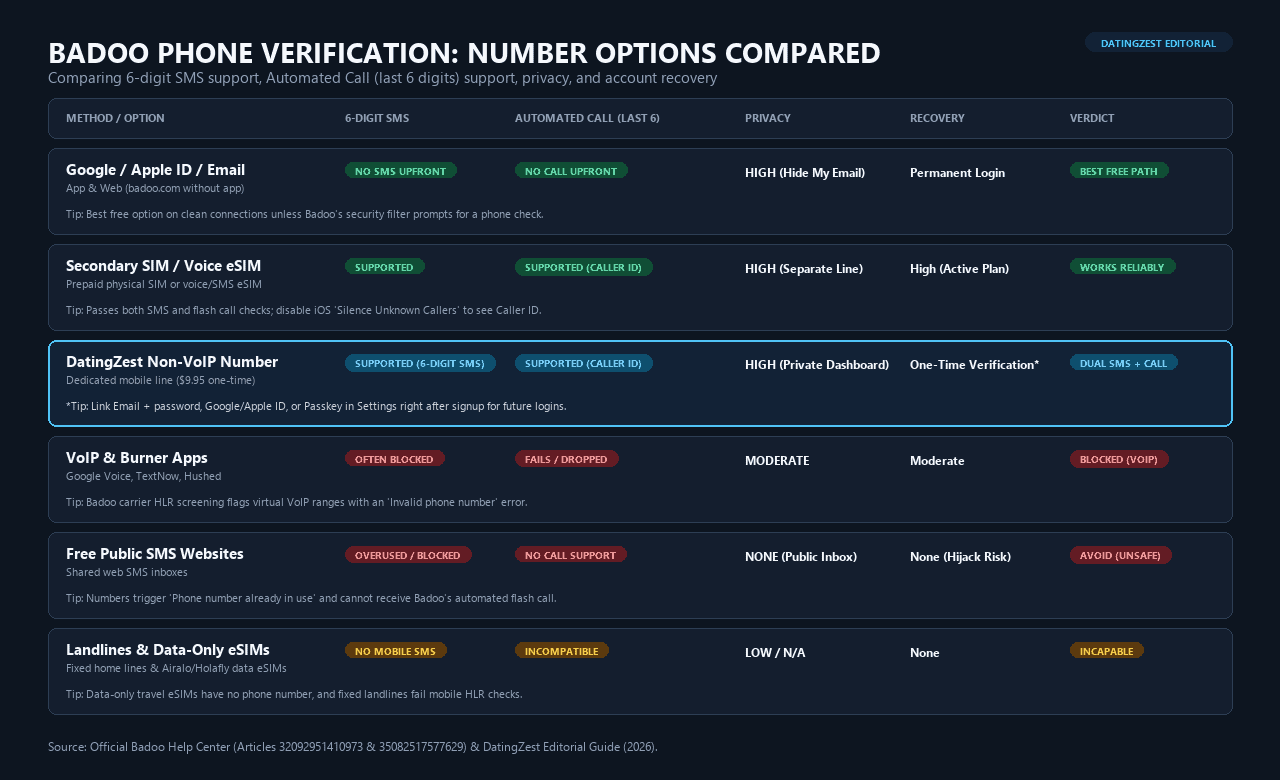
Badoo’s carrier HLR screening blocks VoIP apps and shared public SMS inboxes:
| Opción | SMS | Automated Call | Privacidad | Recovery | Veredicto |
|---|---|---|---|---|---|
| Google/Apple/Email | Ninguno | Ninguno | Alta | Permanente | Best Free |
| Secondary SIM/eSIM | Sí | Yes (Caller ID) | Alta | Alta | Obras |
| DatingZest Non-VoIP | Sí | Yes (Caller ID) | Alta | One-Time* | SMS+Call ($9.95) |
| VoIP (Google Voice) | Bloqueado | Fails | Moderado | Moderado | Bloqueado |
| Public SMS Sites | Bloqueado | No calls | Ninguno | Ninguno | Fails |
| Landlines/Data eSIM | No SMS | Incompatible | Bajo | Ninguno | Incapable |
*Link Email + password, Google/Apple ID, or Passkey in Settings > Account after verifying.
What If Badoo Rejects Your Number or You Miss the Call?
If Badoo blocks your verification attempt, apply the fix matching your exact error:
- Automated call never rings: Phone OS and carrier spam filters frequently silence Badoo’s flash call before you can see the number. Turn off iPhone Silenciar números desconocidos (
Settings > Phone > Silence Unknown Callers) and disable Android/carrier spam call blocking so the incoming Caller ID appears in your call log. - “Phone number already in use”: When you delete a Badoo profile, Badoo keeps the linked phone number locked in a 28-day recovery retention window. You must either wait until day 29, recover the deleted profile via email, or verify with a fresh number (recycled carrier SIM cards previously used on Badoo also trigger this message).
- “Too many attempts”: Stop requesting codes immediately, turn off any VPN, switch from Wi-Fi to mobile data, and wait 24 horas for Badoo’s rate-limit timer to reset.
How to Keep Your Badoo Account Private After Signing Up
Badoo never displays your phone number publicly on your profile, but a few quick settings keep your identity locked down after registration:
- Block contact-list matching: Deny Contacts permission for Badoo in your phone settings (
Settings > Apps > Badoo > Permissions > Contacts) so Badoo never uploads your address book. - Pause your profile when needed (Hide Account vs. Invisible Mode): Turn on Hide Account (free in
Settings > Account) anytime you want to disappear from Encounters and People Nearby without losing your current matches, or use Modo Invisible (Badoo Premium) to browse profiles privately without showing up in visitors lists. - Understand Phone vs. Photo Verification: Verifying a phone number unlocks your account but grants zero profile badges. Earning Badoo’s Blue Checkmark badge requires Verificación fotográfica (taking a live camera selfie matching an on-screen hand gesture in
Profile > Verify), and 18+ age checks require a government ID.
For other platforms, see our guide to aplicaciones de citas sin número de teléfono.
Preguntas frecuentes
How do I bypass Badoo phone number verification?
You can bypass Badoo’s phone screen for free by signing up with Email, Google, Apple ID (on iOS), or Facebook on a clean home network without a VPN. If Badoo still demands a phone check, verify with a secondary SIM or a private non-VoIP number instead of your personal line.
How does Badoo’s automated verification call work?
Badoo places a flash call that rings once or twice and disconnects. Do not answer; check your call log and enter the últimos 6 dígitos del número de la llamada entrante.
Can I sign in to Badoo without downloading the app?
Yes. Open badoo.com in any mobile or desktop browser and sign in with your Email, Google account, Passkey, or phone number without installing the app.
Why does Badoo reject Google Voice or TextNow numbers?
Badoo’s carrier HLR lookup blocks virtual VoIP numbers and cannot complete flash-call Caller ID checks on texting apps.
Does verifying a phone number bypass Badoo Photo Verification?
No. Phone Verification only confirms your mobile line; earning the Blue Checkmark badge requires a live camera selfie pose.

 English
 Portuguese
 Spanish
 French
 German
 Dutch
Por favor, desbloqueen mi cuenta Badoo