
Si estás viendo “Algo salió mal (76itwkq6)”, “No se puede crear una cuenta”, o “Verificación fallida” ¡en Grindr, luego únete a la fila!
Este mensaje de error se refiere a cómo los sistemas de Grindr manejan números de teléfono, dispositivos, redes, y actividad anterior. La buena noticia es que se puede arreglar.
Qué significa el error de registro en Grindr y por qué se produce

En 76itwkq6 el error aparece cuando Grindr bloquea tu registro o intento de inicio de sesión, pero no siempre significa que tu cuenta bloqueada.
Generalmente significa que algo sobre tu número, teléfono o red ha activado una restricción en Grindr. Las causas más comunes son:
- Límites del número de teléfono. Grindr permite un correo electrónico por cuenta y cinco cuentas por número. Si su número ya se ha utilizado en varias cuentas, incluso eliminadas, puede bloquearse.
- Prohibiciones. Las cuentas prohibidas están en una lista negra porque Grindr rastrea datos como dispositivos, nombres de usuario, fotos, etc. Es posible que puedas iniciar sesión en Grindr, pero no registrarte.
- Interferencia de red o VPN. Si usas una VPN o te encuentras en un país donde Grindr está bloqueado, la aplicación puede fallar. Las IPs compartidas o el Wi-Fi público también pueden activar bloqueos.
- Fallos en la verificación de SMS. Grindr rechaza los números públicos, de VoIP y algunos operadores bloquean los SMS de códigos cortos por defecto. Los errores tipográficos también harán que la etapa de verificación falle.
- Problemas con la aplicación o límites de tarifa. Las versiones desactualizadas de la aplicación, los datos corruptos o los intentos de registro de spam dan como resultado bloqueos temporales. A veces, Grindr simplemente limita la velocidad de tu IP o dispositivo durante 24 horas.
- Registro de menores o infracciones de la política. Intentar registrarse siendo menor de 18 años da lugar a una marca permanente que no puede anularse hasta la mayoría de edad.
Identifique cuál puede ser el culpable en su caso, y siga los pasos que se indican a continuación para solucionar el Error de registro en Grindr:
1. Reinicia la aplicación Grindr y tu internet
Empieza por actualizar tu Grindr aplicación y conexión a Internet en caso de que estén transportando bloques pasados.
- En Android, ve a Configuración ➡️ Aplicaciones ➡️ Grindr ➡️ Almacenamiento ➡️ Borrar datos. También, elimina carpetas como /Android/data/com.grindrapp.android/.
- En el iPhone, borra Grindr y vuelve a instalarlo. No lo restaures desde iCloud. Desactiva la copia de seguridad de iCloud para Grindr antes de eliminar la aplicación.
Actualización la aplicación a la última versión y cambiar entre Wi-Fi y datos móviles; reinicie el router para actualizar su Dirección IP antes de intentarlo.
Evite público Wi-Fi y VPNs (a menos que Grindr esté bloqueado en tu país). Intenta cambiar tu DNS a 1.1.1.1 o 8.8.8.8 para una conexión limpia.
Si recientemente ha intentado registrarse varias veces seguidas, espere 24 horas antes de volver a intentarlo porque Grindr aplica límites de velocidad incluso si tus datos son correctos.
2. Regístrese con un número y correo electrónico en Grindr
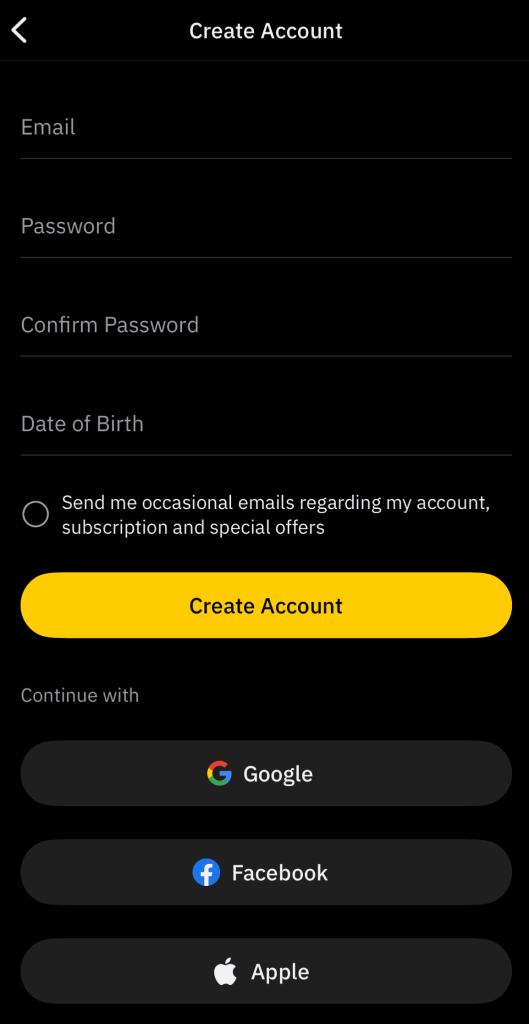
Si tu número de teléfono se utilizó con demasiada frecuencia, Grindr probablemente lo bloqueó, así que regístrate con un número diferente que sea compatible con SMS estándar (no números VoIP ni públicos).
Servicios como DatingZest proporcionar privado, no utilizado números que reciben reales Los códigos SMS de verificación de Grindr. Funcionan mejor que los números virtuales gratuitos o compartidos, que suelen estar bloqueados.
Crea una nueva dirección de correo electrónico que nunca se haya utilizado en Grindr; no utilices servicios de correo electrónico desechables. Si el registro falla, inicia sesión con Google, Apple o Facebook porque esto a menudo omite por completo la verificación por SMS y correo electrónico.
3. Restablecer los identificadores del dispositivo
Grindr rastrea dispositivos, así que debes restablecer tu dispositivo identificación publicitaria para eliminar las banderas vinculadas a tu teléfono antes de instalar Grindr
- En Android: Configuración ➡️ Google ➡️ Anuncios ➡️ Restablecer ID de publicidad.
- En el iPhone: Ajustes ➡️ Privacidad y Seguridad ➡️ Rastreo ➡️ Restablecer Identificador.
4. Regístrate en una cuenta de Grindr en un dispositivo diferente
Si tu dispositivo está bloqueado, crea una cuenta de Google en otro teléfono o en un emulador. Después de registrarte correctamente, inicia sesión con esa nueva cuenta en tu dispositivo original.
⚠️ Si su teléfono original está muy bloqueado, el inicio de sesión podría prohibir la nueva cuenta también. Asegúrese de que su datos de la aplicación antes de intentarlo.
No restaures archivos de Grindr desde copias de seguridad de Google o iCloud porque pueden incluir configuraciones de la aplicación que fueron previamente marcadas o rastreadas, lo que podría traer de vuelta el mismo error incluso en un teléfono nuevo.
En caso necesario, puede restablecimiento de fábrica tu teléfono, pero haz una copia de seguridad sólo de tu contactos y fotos, no aplicaciones o ajustes. Después de restablecer, cree un nuevo Manzana o Google Identifícate e instala Grindr. Utiliza un número y un correo electrónico nuevos al registrarte.
5. Contacta con el soporte de Grindr
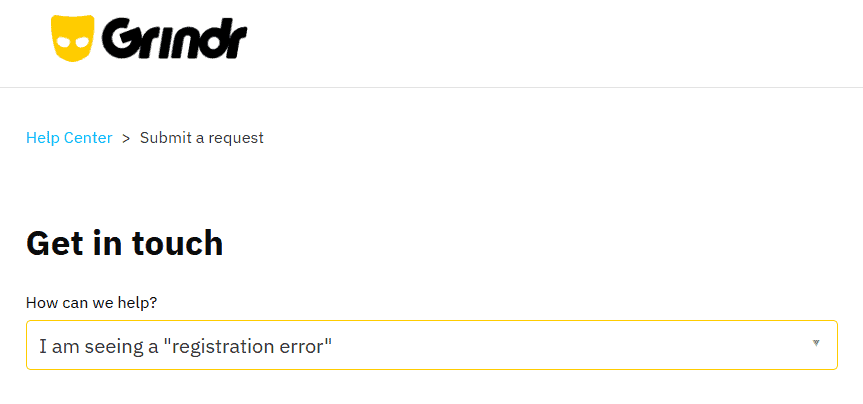
Si ninguno de los pasos anteriores funciona, envía un solicitar a través del Centro de Ayuda de Grindr en “Error de Registro”. Adjunta la siguiente información a tu solicitud:
- Captura de pantalla del error
- Modo de dispositivo, sistema operativo y método de registro utilizado
- País y ciudad
- Si ha utilizado una VPN
- Tu dirección IP pública actual (de whatismyip.com)
El equipo de soporte de Grindr puede comprobar si tu IP o dispositivo está bloqueado. Es posible que también eliminen la restricción, aunque muchos usuarios informan de largos retrasos o ninguna respuesta.
Sé claro y educado. Si le han marcado por error, explique lo ocurrido y que está intentando empezar de nuevo correctamente. Aunque vale la pena enviar una solicitud, es más probable que los pasos anteriores den lugar a una solución más rápida.
Lo que necesitas saber sobre el error de registro de Grindr
Desde hace años, la gente ha estado lidiando con múltiples Errores de Grindr envasados de forma diferente: “Validación/verificación fallida”, “Por favor, inténtelo de nuevo más tarde”, “Número máximo de cuentas”, etc.
Grindr quiere que uses un legal número, no Google Voice, Quemador, En silencio, u otras fuentes de VoIP. Pero si el número no tiene la culpa, tenga en cuenta estos consejos:
- No usar Carpeta segura o herramientas de clonación de aplicaciones. Pueden conservar los datos antiguos de Grindr y traer de vuelta el mismo problema.
- No reutilizar contenido del perfil, fotos, o nombres de usuario de cuentas prohibidas.
- Si Grindr está censurado en tu país, utiliza un VPN, pero siempre registrarse consistentemente desde la misma ubicación de servidor.
- Claro Google Play Servicios de datos de vez en cuando, ya que puede almacenar información de inicio de sesión pasado Grindr puede detectar.
- Asegúrate de que tu dispositivo fecha y tiempo estén configurados correctamente, y evite utilizar GPS aplicaciones o suplantadores de ubicación durante el registro.
Tómese su tiempo, siga los pasos anteriores cuidadosamente y evite el spam en Grindr. La mayoría de los usuarios que enfrentan este problema eventualmente lo resuelven con un número nuevo. Tú también puedes.
Preguntas más frecuentes:
1. ¿Qué significa el error Grindr 76itwkq6?
Es un error general que bloquea su intento de registro o inicio de sesión. Suele ocurrir debido a un número, dispositivo o IP marcados, o a repetidos intentos fallidos.
2. ¿Por qué Grindr no me envía un código de verificación?
Grindr bloquea números virtuales y de VoIP. Necesitas un número de teléfono real que pueda recibir mensajes de texto de códigos cortos. Revisa si hay errores de escritura y asegúrate de que tu operador permita SMS de códigos cortos.
3. ¿Puedo seguir utilizando Grindr si mi dispositivo está bloqueado?
Puedes seguir entrando en las cuentas existentes, pero no puedes crear nuevas. Los bloqueos de dispositivos bloquean los nuevos registros. Prueba primero a restablecer tu ID de anuncio o a registrarte en otro teléfono.
4. ¿El uso de una VPN provoca este error?
Sí, a veces. En países restringidos, las VPN ayudan. Pero en regiones normales, una VPN puede levantar sospechas.
5. ¿Cuántas cuentas puedo abrir con un solo número?
Grindr permite unas cinco cuentas por número de teléfono. Después de eso, deja de funcionar para el registro, incluso si las cuentas antiguas han sido eliminadas.

Deja una respuesta