
Als je ziet “Er ging iets mis (76itwkq6)”, “Kan geen account aanmaken”.”, of “Verificatie mislukt”.” op Grindr, sluit je dan aan bij de rij!
Dit foutbericht heeft betrekking op hoe de systemen van Grindr omgaan met telefoonnummers, apparaten, netwerken, en vroegere activiteit. Het goede nieuws is dat het kan worden opgelost.
Wat de registratiefout bij Grindr betekent en waarom het gebeurt

De 76itwkq6 foutmelding verschijnt wanneer Grindr uw registratie of login-poging blokkeert, maar dit betekent niet altijd dat uw account is verbannen.
Dit betekent meestal dat er iets met je nummer, telefoon of netwerk een beperking op Grindr heeft geactiveerd. Hier zijn de meest voorkomende oorzaken:
- Limieten voor telefoonnummers. Grindr staat één e-mail per account toe en vijf accounts per nummer. Als uw nummer al is gebruikt op meerdere accounts, zelfs verwijderde accounts, kan het worden geblokkeerd.
- Verboden. Geblokkeerde accounts worden op de zwarte lijst gezet omdat Grindr gegevens zoals apparaten, gebruikersnamen, foto's, enz. bijhoudt. Het kan zijn dat je wel kunt inloggen op Grindr, maar niet een account kunt aanmaken.
- Netwerk- of VPN-interferentie. Als u een VPN gebruikt of zich in een land bevindt waar Grindr is geblokkeerd, kan de app kuren vertonen. Gedeelde IP-adressen of openbare wifi kunnen ook blokkades veroorzaken.
- SMS verificatie mislukt. Grindr weigert openbare en VoIP-nummers, en sommige providers blokkeren standaard sms-berichten van korte nummers. Typefouten zullen er ook voor zorgen dat het verificatieproces mislukt.
- App-problemen of tariefbeperkingen. Verouderde appversies, corrupte gegevens of pogingen tot spamregistratie resulteren in tijdelijke blokkades. Soms beperkt Grindr uw IP-adres of apparaat simpelweg voor 24 uur.
- Minderjarige registratie of beleidsovertredingen. Proberen te registreren terwijl je nog geen 18 bent, resulteert in een permanente markering die niet ongedaan kan worden gemaakt totdat je meerderjarig bent.
Bepaal wat in jouw geval de boosdoener kan zijn en volg de onderstaande stappen om het probleem op te lossen Registratiefout op Grindr:
1. Start de Grindr-app en je internet opnieuw op
Begin met het verversen van je Grindr app en internetverbinding in geval ze voorbij blokken dragen.
- Op Android, ga naar Instellingen ➡️ Apps ➡️ Grindr ➡️ Opslag ➡️ Gegevens wissen. Verwijder ook mappen zoals /Android/data/com.grindrapp.android/.
- Op iPhone, Verwijder Grindr en installeer het opnieuw. Herstel het niet vanuit iCloud. Schakel iCloud-back-up voor Grindr uit voordat je de app verwijdert.
Update de app naar de nieuwste versie en schakel tussen Wi-Fi en mobiele gegevens; Start uw router opnieuw op om uw IP-adres voordat je het probeert.
Vermijd openbaar Wi-Fi en VPN's (tenzij Grindr in jouw land geblokkeerd is). Probeer je DNS instellingen op 1.1.1.1 of 8.8.8.8 voor een schone verbinding.
Als u zich onlangs meerdere keren achter elkaar hebt proberen aan te melden, wacht dan even 24 uren voordat je het opnieuw probeert, omdat Grindr limieten oplegt, zelfs als je gegevens correct zijn.
2. Aanmelden met een nummer en e-mail op Grindr
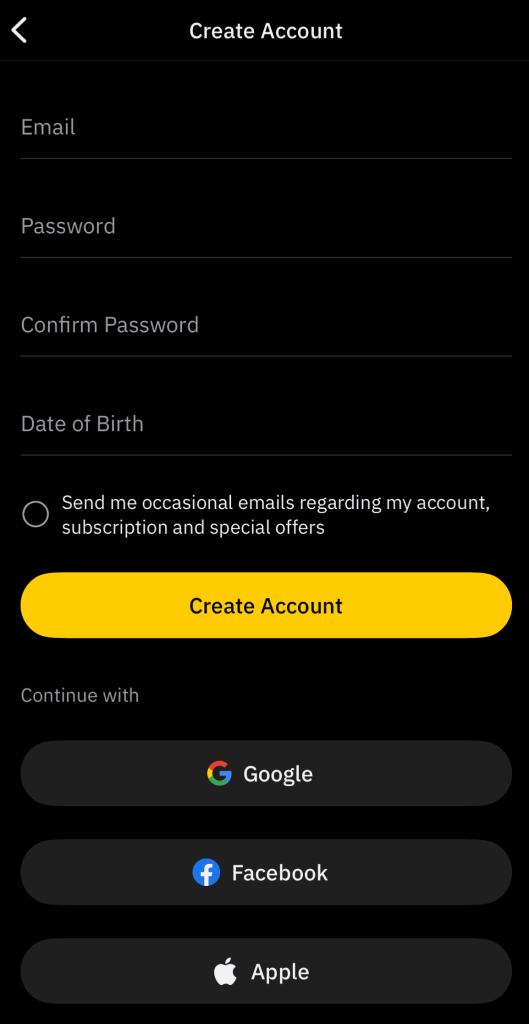
Als je telefoonnummer te vaak werd gebruikt, heeft Grindr het waarschijnlijk geblokkeerd, dus registreer je met een ander nummer dat standaard sms ondersteunt (geen VoIP- of openbare nummers).
Diensten zoals DatingZest aanbieden privé, ongebruikt getallen die echt ontvangen Grindr verificatie SMS-codes. Ze werken beter dan gratis of gedeelde virtuele nummers, die meestal worden geblokkeerd.
Maak een nieuw e-mailadres aan dat nog nooit op Grindr is gebruikt; gebruik geen wegwerpservers voor e-mail. Als de registratie mislukt, meld je dan aan met Google, Apple of Facebook, omdat dit de sms- en e-mailverificatie vaak volledig omzeilt.
3. Uw apparaatidentificaties opnieuw instellen
Grindr volgt apparaten, dus je moet je apparaat opnieuw instellen reclame-ID om vlaggen te verwijderen die aan je telefoon zijn gekoppeld voordat je Grindr installeert
- Op Android: Instellingen ➡️ Google ➡️ Advertenties ➡️ Advertentie-id resetten.
- Op iPhone: Instellingen ➡️ Privacy en beveiliging ➡️ Tracking ➡️ Identificatiegegevens opnieuw instellen.
4. Meld u aan voor een Grindr-account op een ander apparaat
Als je apparaat verbannen is, maak dan een Google-account aan op een andere telefoon of een emulator. Nadat je je succesvol hebt aangemeld, log je in met dat nieuwe account op je oorspronkelijke apparaat.
⚠️ Als uw oorspronkelijke telefoon zwaar geblokkeerd is, kan inloggen ban de nieuwe account ook. Zorg ervoor dat je app-gegevens is gewist voordat je het probeert.
Herstel Grindr-bestanden niet vanuit back-ups van Google of iCloud, omdat deze app-instellingen kunnen bevatten die eerder werden gemarkeerd of getraceerd, wat ertoe kan leiden dat dezelfde fout terugkeert, zelfs op een nieuwe telefoon.
Indien nodig kunt u fabrieksreset uw telefoon, maar maak alleen een back-up van uw contacten en foto's, niet apps of instellingen. Maak na het resetten een nieuwe Appel of Google ID en installeer Grindr. Gebruik een nieuw nummer en e-mailadres bij het registreren.
5. Neem contact op met Grindr Support
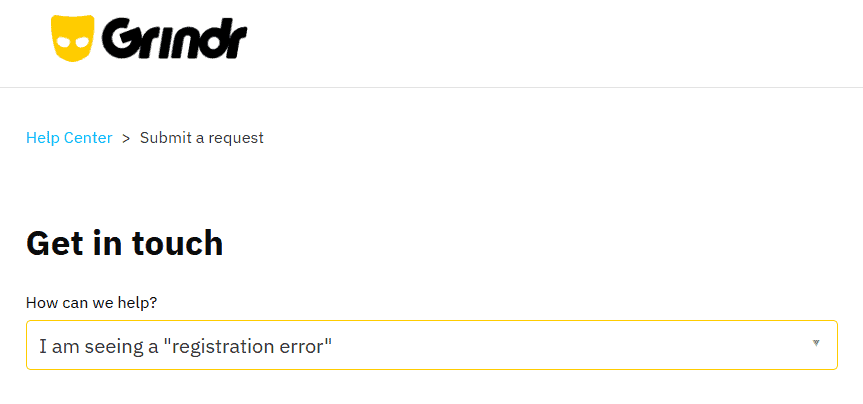
Als geen van de bovenstaande stappen werkt, dien je een verzoek via Grindr's Helpcentrum onder “Registratiefout”. Voeg de volgende informatie toe aan je verzoek:
- Schermafbeelding van de fout
- Apparaatmodus, OS en de gebruikte aanmeldingsmethode
- Land en stad
- Of je nu een VPN hebt gebruikt
- Je huidige openbare IP-adres (van whatismyip.com)
Het Grindr Support Team kan controleren of jouw IP of apparaat geblokkeerd is. Ze kunnen de beperking ook opheffen, maar veel gebruikers melden lange vertragingen of geen antwoord.
Wees duidelijk en beleefd. Als je per ongeluk bent gemarkeerd, leg dan uit wat er is gebeurd en dat je probeert opnieuw te beginnen. Hoewel het de moeite waard is om een verzoek in te dienen, zullen de bovenstaande stappen eerder leiden tot een snellere oplossing.
Wat u moet weten over de registratiefout van Grindr
Mensen hebben al jaren te maken met meerdere Grindr fouten anders verpakt: “Validatie/Verificatie mislukt”, “Probeer het later nog eens”, “Maximum aantal accounts”.”, enz.
Grindr wil dat je een gebruikt legitiem nummer, niet Google Voice, Brander, Gedempt, of andere VoIP-bronnen. Maar als het nummer niet de schuldige is, overweeg dan deze tips:
- Niet gebruiken Beveiligde map of app-kloonprogramma's. Ze kunnen oude Grindr-gegevens bewaren en hetzelfde probleem terugbrengen.
- Niet hergebruiken profielinhoud, foto's, of gebruikersnamen van geblokkeerde accounts.
- Als Grindr in jouw land wordt gecensureerd, gebruik dan een betrouwbare VPN, maar registreer altijd consistent vanaf dezelfde serverlocatie.
- Duidelijk Google Play Services gegevens af en toe, omdat het inloggegevens uit het verleden kan opslaan die Grindr kan detecteren.
- Zorg ervoor dat uw apparaat datum en tijd correct zijn ingesteld en vermijd het gebruik van valse GPS apps of locatievervalsers tijdens het aanmelden.
Neem de tijd, volg de bovenstaande stappen zorgvuldig en vermijd spammen op Grindr. De meeste gebruikers die dit probleem tegenkomen, lossen het uiteindelijk op met een nieuw nummer. Dat kan jij ook.
Veelgestelde vragen:
1. Wat betekent de foutmelding Grindr 76itwkq6?
Het is een algemene fout die je registratie of aanmeldpoging blokkeert. Dit gebeurt meestal door een gemarkeerd nummer, apparaat, IP of herhaalde mislukte pogingen.
2. Waarom stuurt Grindr me geen verificatiecode?
Grindr blokkeert virtuele en VoIP-nummers. Je hebt een echt telefoonnummer nodig dat sms-berichten van korte codes kan ontvangen. Controleer op typfouten en zorg ervoor dat je provider sms-berichten van korte codes toestaat.
3. Kan ik Grindr nog steeds gebruiken als mijn apparaat verboden is?
Je kunt je nog steeds aanmelden bij bestaande accounts, maar je kunt geen nieuwe aanmaken. Toestelverboden blokkeren nieuwe registraties. Probeer eerst je advertentie-ID te resetten of je op een andere telefoon te registreren.
4. Veroorzaakt het gebruik van een VPN deze fout?
Ja, soms. In landen met beperkingen helpen VPN's. Maar in normale regio's kan een VPN argwaan wekken.
5. Hoeveel rekeningen kan ik maken met één nummer?
Grindr staat ongeveer vijf accounts per telefoonnummer toe. Daarna werkt het niet meer voor registratie, zelfs als oude accounts zijn verwijderd.

 English
  Portuguese
  Spanish
  French
  German
  Dutch
Dutch
Geef een reactie